Affiliate link - I may earn a commission at no extra cost to you. As an Amazon Associate I earn from qualifying purchases; some links go to other retailers with the same arrangement.
Quick verdict
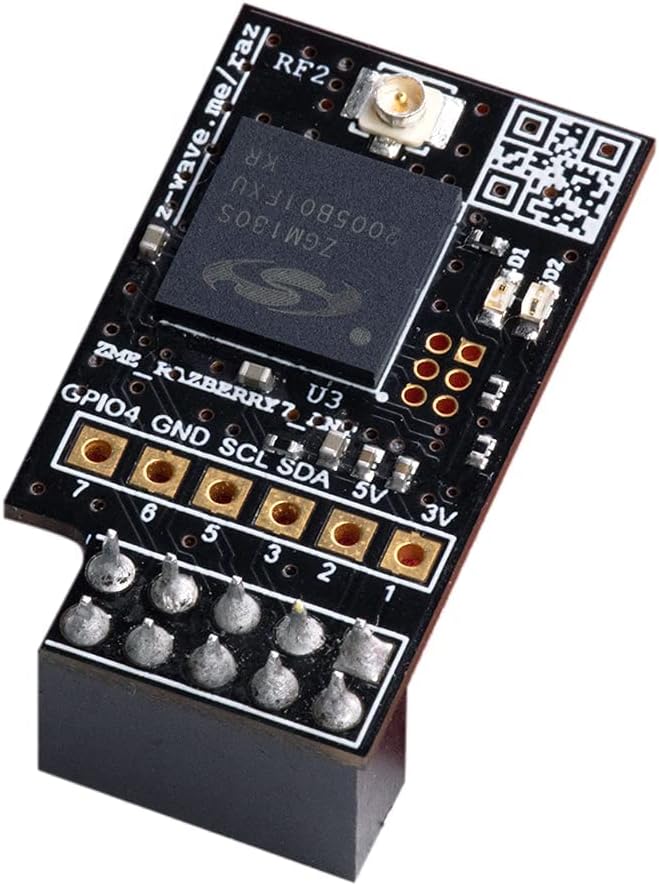
The RaZberry 7 Pro is a clean solution for adding Z-Wave to a Raspberry Pi without a USB dongle hanging off the side. The 700 series chip is solid and SmartStart makes pairing new devices easier. The limitation is obvious: it only works on a Pi. If you have moved to a mini PC for Home Assistant, a USB Z-Wave stick is the better path.
Standout: GPIO hat form factor integrates the Z-Wave 700 series radio directly onto a Raspberry Pi without consuming a USB port.
Notes last checked May 31, 2026.
Compatibility snapshot
Home AssistantgoodReliable local integration with minor caveats (a hub, manual config, or polling). Core function works locally.
Apple HomenoneNo official support on this platform.
Google HomenoneNo official support on this platform.
AlexanoneNo official support on this platform.
Works offlineyes
Setupmoderate
Extra hub neededno
PowerGPIO HAT (Raspberry Pi)
Local control facts
Home Assistant: zwave_js integration, Local Push (home-assistant.io, checked Sep 10, 2026)
Why it stands out
GPIO form factor keeps the Z-Wave radio directly on the Raspberry Pi without using a USB port
Z-Wave 700 series chip with excellent range and SmartStart support
well-established manufacturer with long history in the Z-Wave ecosystem
Reasons to hesitate
only works with Raspberry Pi GPIO header, not compatible with mini PCs or other hardware
GPIO serial port configuration can conflict with Bluetooth on the Pi, requiring setup tweaks
Z-Wave 800 series chips are now available in newer competitors with better range
Best for
Raspberry Pi-based Home Assistant setups that want Z-Wave without using a USB port
existing Z-Wave households that want to add a coordinator to their Pi
Avoid if
you are running Home Assistant on a mini PC, NUC, or anything without a GPIO header
you want the latest Z-Wave 800 series chip for maximum range and efficiency
Privacy and local-control notes
Fully local Z-Wave coordinator with no cloud component. All Z-Wave communication stays on your local network.
Home Assistant support: supported · integration path: Z-Wave JS.
Buying reality check
Price notes: Priced similarly to USB Z-Wave sticks. Only useful if you have a Raspberry Pi with available GPIO header.